
How Do Online Exams Work? A Student’s Guide to the Online Exam Process
If you’ve never done a test outside a classroom, the idea of an online exam can be pretty intimidating. Where do you even start? Who’s keeping an eye on things? What happens if your Wi-Fi decides to go out mid-question – that kind of thing.
Overwhelmed Before Your Online Exam?
Don’t let login screens and lockdown browsers add to your stress. Pay someone to take my online exam and finally relax.
If you don’t have any clue how the online examination system works before you start answering questions, you’re pretty much leaving your GPA up to chance.
This guide walks you through the online exam process step by step, so you know what to expect in an online exam. It shows you what can actually cost you points, too.
If a demanding semester leaves you short on study time, investing in trusted homework assistance can help you stay on top of your coursework while freeing up the hours you need to prepare for your exams.
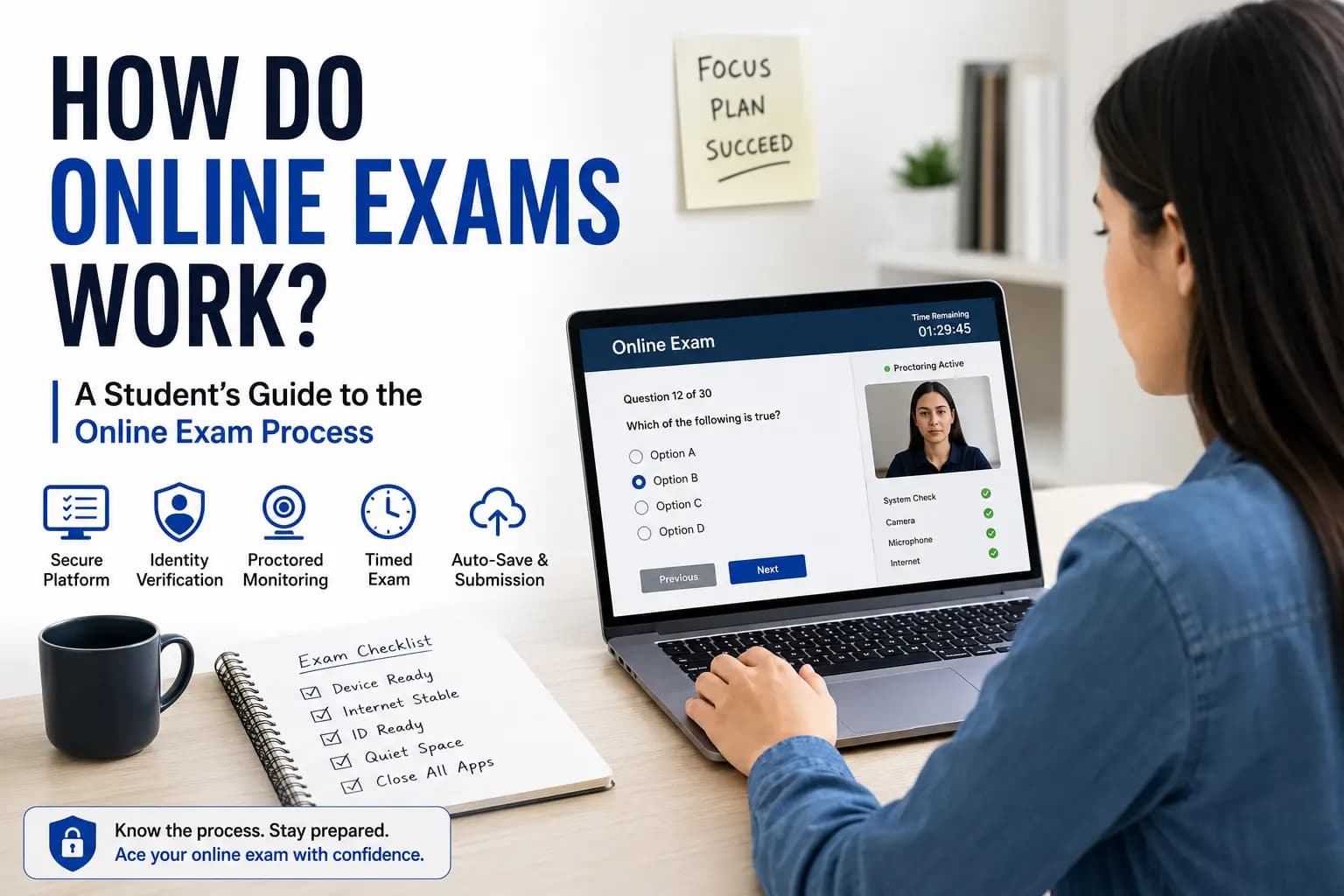
What Is an Online Examination System?
Most of the panic students feel comes from interacting with the software for the very first time while taking their proctored final. However, once you look behind the screen, you will see that all proctored finals run on the same simple set of procedures.
An online examination system is really two things working together, not one:
- The Learning Management System (LMS): This is where your course lives. Canvas, Blackboard, Moodle, and Brightspace are the most common ones in universities. It’s the place where your questions are stored, your answers are recorded, the timer ticks away, and where you type out your essay.
- The proctoring layer: A Separate security software that ties in with the LMS whenever you need a bit more supervision such as Respondus LockDown Browser, Honorlock, and Proctorio.
Think of it this way: the LMS is your exam paper, and the proctoring tool is the invigilator standing over your shoulder – each doing their own thing, but together making the whole system work.
Need Help Writing Under Pressure?- Protect your GPA and structure strong arguments without time stress.
- Pay for essay writing help and boost your score now.
Strategic Ways to Handle Each Part of the Platform
Learning Management System (LMS) Strategy
Know which LMS your school uses. The interface differs between Canvas, Moodle, and Blackboard, exploring unfamiliar interface for the time can waste your time you need for the actual questions, especially when need to navigate multi-column problems or tables, which may occur whether you are taking the test yourself or paying someone to take my accounting exam for you.
Proctoring Software Strategy
Knowing which one your school uses changes how you should prep for online proctored exams. If it is a LockDown Browser, then don’t even go to the trouble of opening a second tab, it cannot be done. If it’s Proctorio, switching tabs won’t end your exam, but it will show up in your activity report.
Identity & Room Verification Strategy
Be sure to use the webcam ID check and room scan before the exam window opens, not after; otherwise, you will be taking up some of your test time to get them right. High stakes healthcare modules leave no room for error, which is why students choose to pay someone to take my online nursing exam for me rather than risk compliance flags.
Timer & Auto-Submit Strategy
Watch for low-time warnings, usually at 10 and 5 minutes, and don’t ignore them. Never assume you’ll get “just one more minute”, the system usually won’t give it to you.
Activity & Tab Tracking Strategy
One of the most common problems is not closing apps properly, not just minimizing them, some websites automatically lock you out if they detect Discord, OBS or any other application in the background. This is especially tricky for students working through code, since needing to check documentation mid-exam is exactly the kind of tab-switch that gets logged.
Server-Side Auto-Save Strategy
If your internet goes down while you are taking an exam, it is best not to keep trying to reload the page as it can sometimes lead to more problems than the disconnect, the best thing to do is take a screenshot of the error along with the time you received it at.

Math Assignment Help

Chemistry Homework Help

Law Online Class Help
Understanding the Online Exam Platform: 6 Core Components
Stores your questions, tracks answers, and runs your exam timer.
Monitors or locks your browser to prevent cheating during the test.
Confirms it's really you, alone, in an approved space.
Auto-submits your exam the instant the countdown hits zero.
Logs tab switches and window focus, even without lockdown mode.
Saves your progress continuously so a dropped connection isn't dangerous.
The Online Exam Process: Step by Step
- Enrollment and scheduling
An exam window is set by your instructor. Either a set date and time or a set window of time (e.g., 48 hours) during which you may start at any time in the window. A link or access key will be provided via your LMS or email. - System check
Most platforms assess the internet speed, webcam, microphone and browser before opening the exam. At this time you are also supposed to close any background applications such as Discord, Spotify, or screen recorders, and some proctoring software prevents you from starting until they are completely closed, not just minimized. - Identity verification
When taking a proctored exam, you will need to show a picture of a government ID to your webcam, and the software (or live proctoring) will verify that it is you.
- Environment scan
There are a number of proctoring tools that require you to slowly pan your webcam around your room to see if there are any notes, phones, extra monitors, or someone else in the room. - The exam itself
If verified the test will appear in a locked or monitored browser. Questions are answered within the time limit and activity is logged in real time. - Submission
You submit manually or when time expires, it should be submitted automatically.
- Review and grading
Most multiple-choice sections are automatically marked. Written responses go to your instructor. If anything was flagged during proctoring, don’t panic, you didn’t do anything. Only the supervisor reviewed the exam.
This entire flow is how online exams work, whether you choose to take my statistics exam for me or tackle a major 40% Chemistry final.
Online Exam Requirements: What You Need Before You Start
- A reliable laptop or desktop device: tablets and phones are often blocked
- A stable internet connection, wired if you have the option
- Updated Chrome or Firefox, or whatever your school specifically requires
- Working webcam and microphone
- A government-issued ID
- Only one monitor connected. Dual-monitor setups are flagged as a compliance violation
- A fully charged device or access to a power outlet
- A quiet, private, well-lit room
The Three Types of Online Proctoring
The Three Types of Online Proctoring
It helps to know which category your exam falls into:
Live Monitoring: where a real person monitors you as you complete the exam).
Record and review: your session is recorded and only reviewed if something looks suspicious or if it is randomly picked up.
AI proctoring (no live human supervision): AI identifies suspicious action and alerts the human for further review
Online Exam Rules You Need to Know
- No leaving the frame or the room without permission
- No talking, unless the exam specifically requires reading aloud
- No other devices visible or in reach
- No other people entering the room
- No unauthorized notes, books, or browser tabs
- Stay within the exam window the entire time
Timer and Pacing: What Actually Happens During the Online Test Procedure
Online exams run on a visible countdown timer, and most platforms auto-submit the moment it hits zero, whatever you’ve answered gets locked in, and anything blank stays blank.
One thing to watch for: “No Backtracking” mode. Some instructors set exams to show one question per page, and once you click “Next,” that question locks, you can’t go back.
If your exam works this way, treat every question as final the moment you answer it. Don’t plan to “come back to it later.”
Simple pacing guide by question type:
| Question Type | Time To Spend | Approach |
| Multiple Choice | 30–45 seconds | Answer fast, eliminate obvious wrong options |
| Short Answer | 3–5 minutes | Be direct, lead with the key term or concept |
| Essay | 20–30 minutes | Draft a 3-point outline first |
This pacing logic holds whether you’re staring down a statistics exam full of calculations or a chemistry exam mixing multiple-choice with lab-based problems, the platform mechanics don’t change, only the content does.
If your test involves calculations, learning how to prepare for maths exam steps ahead of time helps you execute the best strategy to easily complete your online test before time runs out.
The Emergency Recovery Protocol: What to Do If Your Internet Drops Mid-Exam
If your internet disconnects during remote online exams, follow this sequence to protect your grade:
- Do not close the browser window, immediate action
Do not Panic Close your active testing window or Close your proctoring app. If you close it down, it will sever the connection to your local answers that are stored in your browser, and may remove any unsaved essay text or selections before they sync up to the server. - Capture proof within 60 seconds
Be sure that the picture is clear enough to display the active question and the time indicated on your device’s clock, as well as the error message or “frozen” screen if any. This is your proof if you need to appeal later. - Attempt a network reset , 1 to 3 minutes
Toggle your Wi-Fi off and back on. If you’re near your router, plug in an Ethernet cable instead, a wired connection sidesteps most local Wi-Fi drops entirely. - Force a reboot only as a last resort
If the mouse and keyboard are completely locked up, press the power button to shut them down. Restart and re-launch exam software and log back in. Most systems will allow you to start where you left off as long as your exam window hasn’t elapsed completely.
The most important step: Once the exam window has closed, send your instructor an email ASAP. Write the time the disconnect occurred and attach screen shots. When a technical problem occurs, don’t delay reporting it, it’s not going to get better by itself, it’s going to get better when you report it.
Common Errors Students Make and Lose Points On
- Pasting from Word documents that break the formatting, and the software may flag the pasting as a suspicious bulk-paste
- Forgetting to fully close background apps, not just minimizing them
- Assuming Ctrl+F will save you on open-note exams, many instructors reword questions specifically to prevent this
- Failure to read the point distribution before working through the problems,and spending equal time on sections worth unequal marks
These kinds of mistakes usually happen, when students have homework or assignments due like a stats or finance assignment due the same week as your exam. Some students pay someone to do my finance homework or homework in other subjects during exam week to avoid this burn out.
How to Take an Online Exam: Pre-Test Checklist
- Device is 100% charged or plugged in
- Only one monitor is attached.
- Internet tested, wired (if possible)
- The software you need and a browser update are installed.
- All background applications have been completely closed.
If a heavy course load elsewhere is what’s making exam week unmanageable, some students get help managing an entire online class for the semester so they can put full focus into the one exam that actually matters.
Conclusion
Online exams are not paper exams transferred to a web screen, they’re run on identity checks, browser lockdowns, activity logs and strict time limits. Knowing how to use your platform – either Respondus, Proctorio or a live proctor – takes away a lot of the stress. You know what to expect, and what to do if it goes wrong. So this is the basics of the virtual exam process: know the system and it won’t run you.
Frequently Asked Questions
Does tab-switching always end my exam?
What happens if I run out of time?
Is a dropped internet connection held against me?
Do all online exams use webcam monitoring?
What is "No Backtracking" mode?
Can I use notes during an online exam?
Do you need a camera on for online exams?
What should I do if my school's proctoring software won't work?
Understand exam formats, practice key topics, and build confidence with personalized tutoring.
Free Inquiry · No Card Required · Reply in 15 MinutesFree Inquiry · Reply in 15 Minutes



Need Professional Help With Your Exam Season?
Our team of experts is ready to guide you through every step, whether it’s a proctored midterm, a timed final exam, or an entire course load this whole semester.
View Our Services